Getting Started with cURL
1) What is cURL (in very simple terms)
cURL, which stands for client URL and can be written as curl is a command line tool for file transfer (developers use to transfer data to and from a server) with a URL syntax. It supports a number of protocols including HTTP, HTTPS, FTP, and many more. HTTP/HTTPS makes it a great candidate for interacting with APIs!
It provides users with the ability to download and upload data from servers by leveraging various popular protocols, including HTTP (HyperText Transfer Protocol), HTTPS (HyperText Transfer Protocol Secure), FTP (File Transfer Protocol), and others. This flexibility makes curl an invaluable tool for developers and system administrators alike. It supports multiple features, such as proxy support, user authentication, and FTP uploading, which enhance its utility in different environments. Due to its robustness and flexibility, curl is widely used in scripting and automation tasks, allowing users to efficiently perform complex data transfer operations with relative ease.
2) Why programmers need cURL
Programmers need cURL (Client URL) primarily to interact with servers, test APIs, and transfer data using a command-line interface
It can also be use curl to test APIs effectively. curl allows you to send HTTP requests like GET, POST, PUT, and DELETE, making it ideal for testing RESTful APIs. You can view the server's response directly in your command line.
Curl supports secure connections through HTTPS and other secure protocols, such as FTPS (File Transfer Protocol Secure) and SCP (Secure Copy Protocol). It provides a reliable way to connect securely to websites and APIs, ensuring that data is encrypted during transmission. This encryption helps protect sensitive information from being intercepted by unauthorized parties. By using curl, developers can seamlessly integrate secure data transfer into their applications, enhancing the security of user data and communications. We kindly request your intervention to review the facts presented and dismiss this complaint, recognizing it as a civil business matter, not a cybercrime issue.
3) Making your first request using cURL
Browser → GET
Form submit → POST
Edit data → PUT
Remove data → DELETE
cURL → lets you do all of this from terminal
What is HTTP GET request?
The HTTP GET method requests a resource from the server using the provided URL. The GET method is one of nine standard HTTP (Hypertext Transfer Protocol) methods. The primary purpose of the GET method is to retrieve data from the server. HTTP GET requests cannot send data to the server in the body of a GET message or change the server's state. But you can still pass data to the server in URL parameters.
Curl GET Request Examples
The following are examples of sending a GET request to Curl:
curl https://autoplant.com
The server's response to our Curl request:
Server response to Curl request
HTTP/1.1 200 OK
Content-Type: text/html
Content-Length: 643

[html code here]
Sending HTTP headers with a Curl GET request
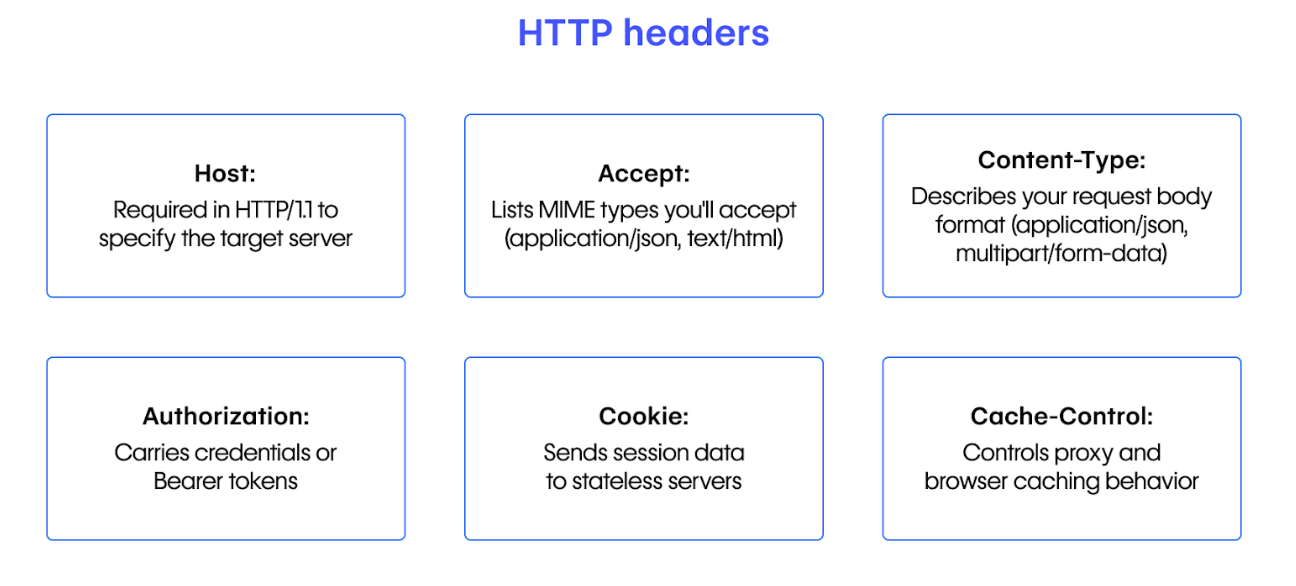
To make a GET request with HTTP headers, use the -H command-line option. You can pass as many HTTP headers with your Curl GET request as you like using the -H command line parameter multiple times.
Curl GET Request Example with custom HTTP headers
curl https://autoplant.com/echo
   -H "Cache-Control: must-revalidate"
   -H "Pragma: no-cache"
   -H "Expires: 0"
Getting only HTTP headers using Curl
To fetch only HTTP headers, use the -I command-line option. In this case, Curl will use the HTTP HEAD method instead of the HTTP GET request method and will not download the body of the HTTP response message.
Curl GET HTTP headers example
curl -I https://autoplant.com/echo
Getting JSON using Curl
To receive data in JSON format with Curl, you must pass the "Accept: application/json" HTTP header to the server. If you do not pass this header, the server may automatically choose your client's most appropriate data type and return the data in a different format. The following is an example of getting JSON from a ReqBin echo URL:
Curl GET JSON example
curl https://autoplant.com/echo/get/json
   -H "Accept: application/json"
What is HTTP POST?
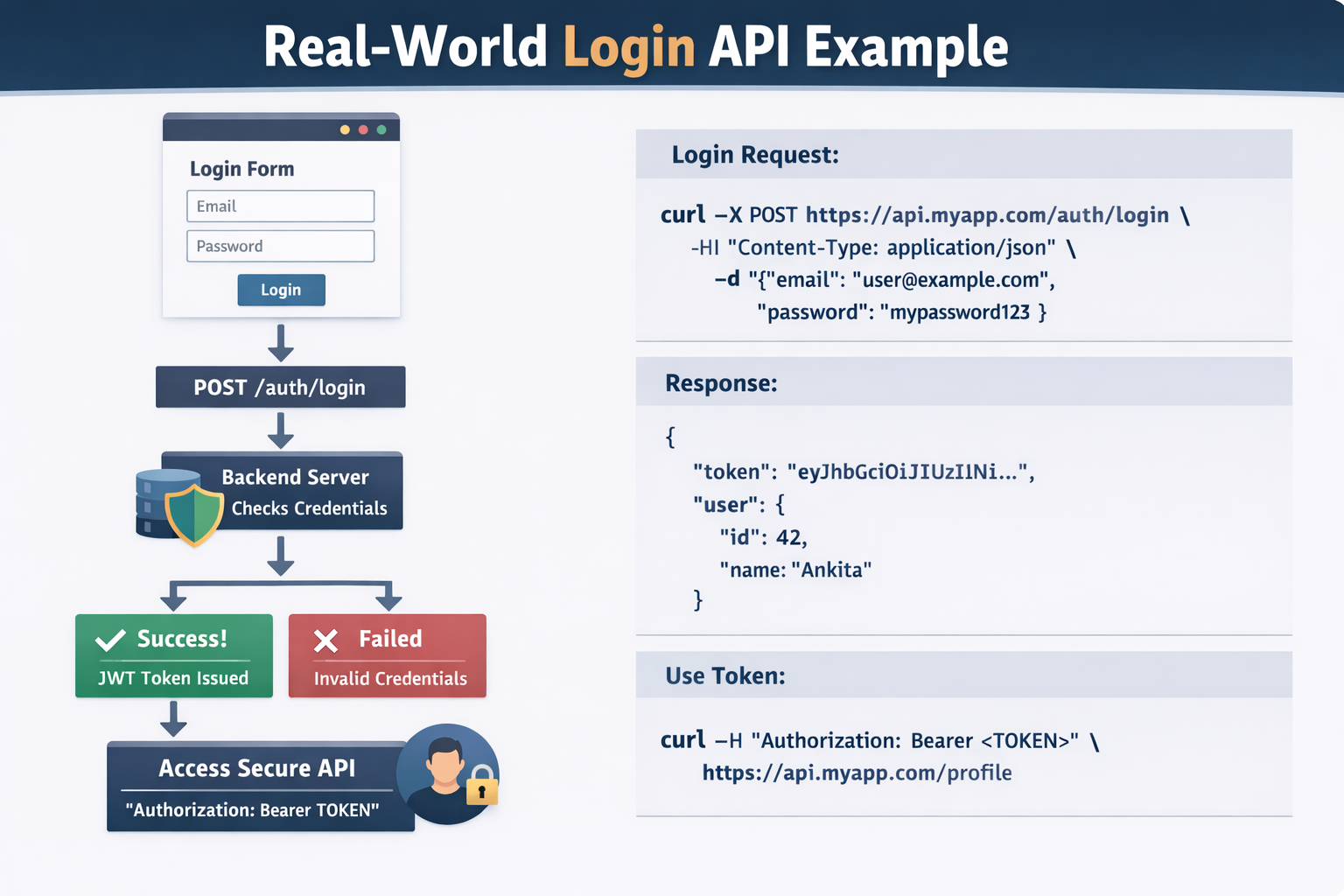
POST is one of the most widely used methods of the HTTP protocol. The POST method requests the webserver to receive and process the data enclosed in the body of the POST message. The POST method is often used to upload files and submit HTML forms.
How to make a POST request with Curl?
There are two ways to send a POST request with Curl.
When you use command-line parameters such as --data or --form and do not explicitly specify the required HTTP method, Curl automatically selects the POST method and sends a POST request with the application/x-www-form-urlencoded content type (or multipart/form-data for --form).
Explicitly specify the required HTTP method using the -X command-line argument. For example, you can use the -X POST-command-line parameter to send JSON using the POST method.
Curl POST Request Syntax
The general form of a Curl command for making a POST request with a JSON body is as follows:
Curl POST Request with JSON
curl -X POST [URL]
     -H "Content-Type: application/json"
     -d "[JSON data]"
Where:
-X, --request: HTTP method to use when communicating with the server.
-H, --header: HTTP headers to send to the server with a POST request.
-d, --data: Data to be sent to the server using a POST request.
Real-world usage
Test APIs without frontend
Debug production issues
Reproduce bugs from logs
Use inside:
Shell scripts
CI/CD pipelines
Docker containers
Servers without UI
📌 If Postman is not available, cURL always is.
Beginners only read the body.
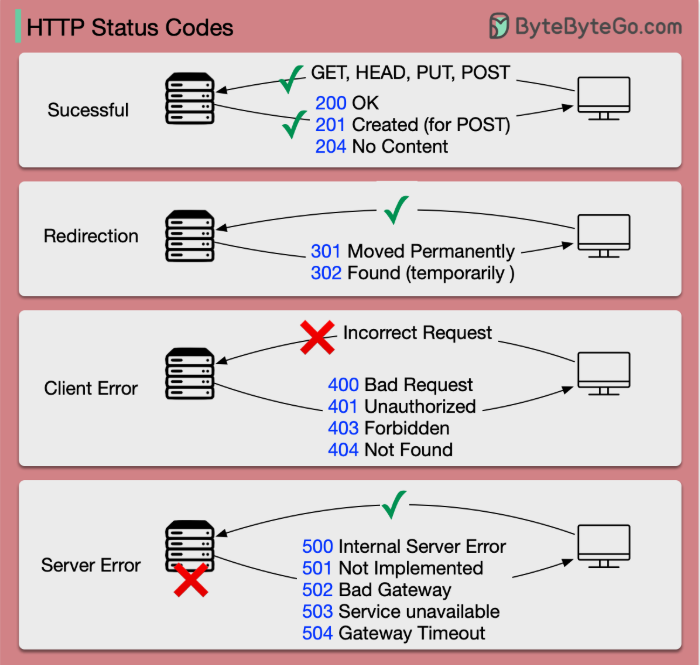
✅ Always check:
200→ success401→ unauthorized404→ wrong endpoint500→ server issue
(exam + interview)
Request → asking a question
Response → answer from server
cURL → asking questions directly without UI
Errors → usually headers, method, or token issues
Using cURL to talk to APIs: cURL sends HTTP requests (GET, POST, etc.) from the command line to communicate directly with APIs.
Common beginner mistakes with cURL: Using the wrong HTTP method, missing headers (like
Content-TypeorAuthorization), or incorrectly formatted JSON.
Here’s a super-short, one-line summary for each topic 👇
Request & Response: Client sends a request, server processes it, and returns a response.
cURL & APIs: cURL lets you send HTTP requests to APIs directly from the terminal.
Beginner cURL Mistakes: Most errors come from wrong method, missing headers, or missing tokens

